How to Submit a Photo to the Gallery
This submission process require you to log in using a public ID and follow a six step process.
Before you post your photos:
- Please limit the photo posting to ONE photo per dog. You may, however, post photos of the same dog at different stages of their life, such as puppy, adult, and senior.
- Please be sure that your photos are in one of these formats: JPG, GIF, PNG.
- This gallery also accepts mini-movies in these formats: AVI, MPG, MPEG, WMV, MOV. Please keep these movies to 10 seconds or less. (This is experimental so we'll see how it goes in the gallery)
- Images can be loaded off your hard drive (recommended), CD-ROM or a web page.
When you are ready to post your photos (read to end before trying):
- Click
HERE go to the Gallery. A new window will pop up so you can follow along on this page.
- In the new window with the Gallery, click on the "Login" link located top right. Your Forum/Message Board ID and password will not work here. You must use the following ID and password to submit photos.
-
Username: submit
Password: submit
- Click on the "Photo Submissions" album or image in the gallery.
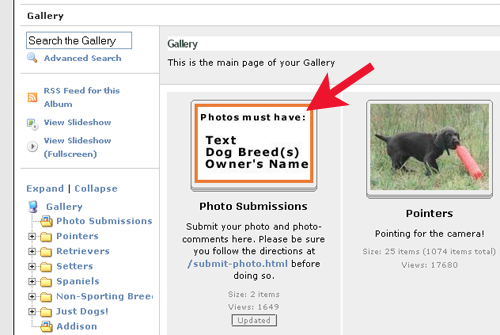
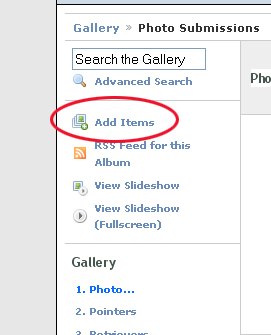
- Now that you are in the "Photo Submissions" album, you can post your photos. Click on the link "Add Items" link located in the left menu.
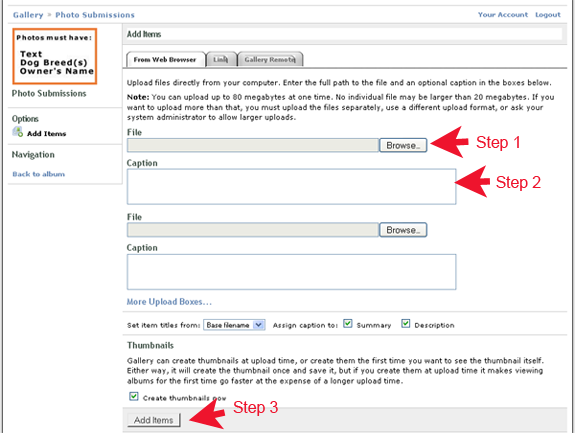
- Selct the Tab you will use to upload photos. To easiest method to use is the "From Web Browser" which will upload images from your computer's harddrive, CD-ROM, or USB stick.
- Click on the "Browse" button to locate the file/path that your photo is located at.
- Before you click on the "Upload now" button, you must enter in your photo's caption. This is located under the file path of each of your photos. Photos without comments will not be posted. You must include the dog owner's or the owner of the image in the comment, as well as the breed of the dog in the photo.
- Now click on the "Add Items" button located at the bottom of the page.
- You are now done. Click on the "Logout" link located top right.
follow us on:
|